Viewing consent details
After you search for a User ID, the details page opens with every consent record for that visitor.
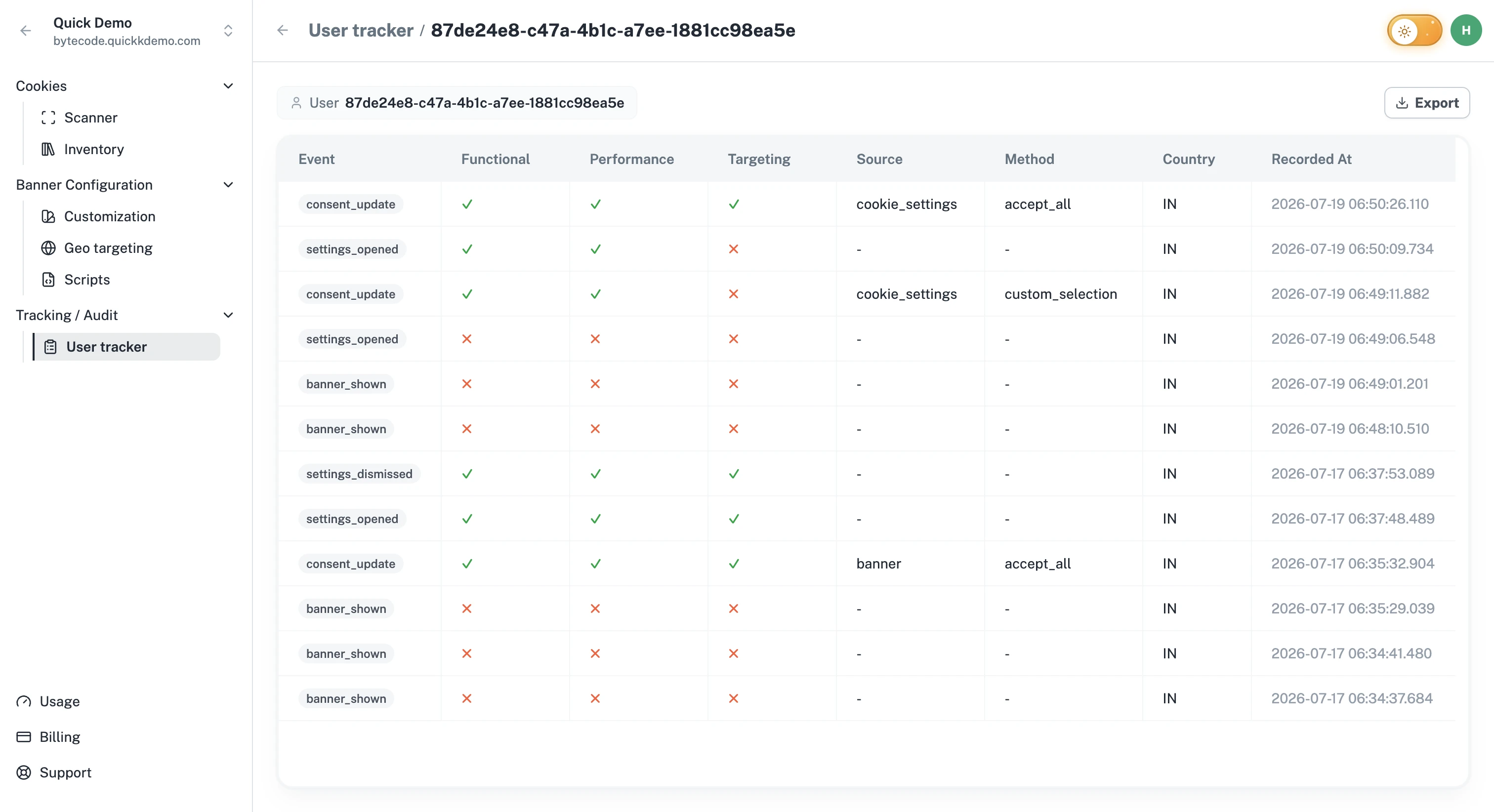
The header
At the top of the page you'll see:
The User ID you searched for.
The date range if one was applied.
A button to Export the records (Owners and Admins only).
The table
Each row is a single consent event for that visitor. The columns are:
Event. The action they took (for example, Accept All, Reject All, Confirm My Choices).
Functional / Performance / Targeting. A check or cross showing which categories were accepted at this moment.
Source. Which surface the consent came from (banner, cookie settings popup, floating button).
Method. How it was given (Accept All, Reject All, individual choice).
Country. The visitor's region.
Recorded At. When One Privacy received the event.
Reading a row
Each row tells the full story of one consent moment: what they chose, where on the banner they chose it, and when it happened. Reading the rows top to bottom shows how the visitor's consent changed over time. You should never need to chase information across multiple systems.
Need to share these records?
Use the Export button in the header. The export is sent to your email as a downloadable file. See Exporting consent records.